
How to Make Your iPhone Live Stream Better on a Budget
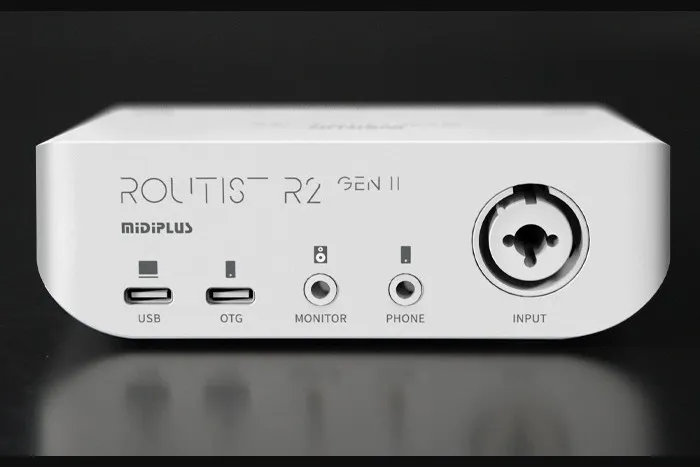
Heads up: this post is from OTORELAY. We sell the MIDIPLUS Routist R2 GEN II.
Quick answer: The cheapest way to make your iPhone stream noticeably better? Get a real mic. Plug a starter condenser mic (like an AT2020, AKG P120, RODE NT1 or Lewitt LCT 240 Pro) into a little interface that connects to phones, like the MIDIPLUS R2 GEN II, then plug that into your iPhone. Tons of streamers in China do exactly this. It’s cheap, and it beats the phone alone by a mile.
Here’s why it works and what to watch for.
Why your phone alone holds you back
Your iPhone’s mics are fine for calls and quick videos. Live streams are a different story.
- Your phone mount can cover them. Clamps, ring lights and tripod holders love to block the little mic holes. You sound muffled and don’t even know until someone in chat says so.
- You’re too far away. The phone’s usually an arm’s length away so the camera can see you. The farther the mic is from your mouth, the more room noise you get and the less you.
Why not a clip-on mic?
Wireless lav mics seem like the obvious fix. They’re fine for some stuff. But for streaming from one spot, there are two problems:
- You have to charge them. Nothing’s worse than the mic dying halfway through a long stream.
- Lots of them are omnidirectional. That means they hear everything around you. The fan, the street, the TV in the next room.
The cheap fix: condenser mic + phone-ready interface
A condenser mic on a desk stand or arm picks up your voice really clearly. Even if you lean back or talk from a bit farther away, it still gets you. Most starter condensers are cardioid, which just means they mostly hear what’s in front of them and less from the sides and back.
One catch: condenser mics need 48V phantom power. That’s a little bit of power sent through the mic cable. Your phone can’t do that, but an interface can. And you want one with an OTG port, which is just a port made for plugging into phones.
Starter condenser mics people use a lot
| Mic | Type | Hears mostly | Notes |
|---|---|---|---|
| Audio-Technica AT2020 | Condenser | Front (cardioid) | Super common starter mic, crisp and bright |
| AKG P120 | Condenser | Front (cardioid) | Budget AKG pick |
| RODE NT1 | Condenser | Front (cardioid) | Known for being really quiet |
| Lewitt LCT 240 Pro | Condenser | Front (cardioid) | Compact and clean |
All four need phantom power, and the R2 handles that.
Two ways to set it up
Option 1: Just your phone (easiest)
Mic → R2 → OTG → iPhone. That’s it. The phone streams whatever the R2 sends it. Here’s how you get the most out of it: keep the mic a hand or two from your mouth, set the level so your loudest parts don’t distort, and find a quiet room. This one’s the cheapest and fastest.
Option 2: Phone + computer (best sound)
Here’s the cool part. The R2 can plug into a computer and a phone at the same time. Computer goes in the main USB-C port, iPhone goes in the OTG port.
Mic → R2 → computer (Studio One or another DAW) → back out the R2’s OTG port → iPhone streams
A DAW is just music software for recording and adding effects. Think of it as your effects box here. Load a singing preset or a “radio voice” preset, add some EQ and compression, and throw Slate Digital’s free Fresh Air plugin on top for extra sparkle. The polished voice goes into your iPhone, and the phone still runs the stream with its camera and app. Viewers just hear the better version.
| Just your phone | Phone + computer | |
|---|---|---|
| Gear | Mic, R2, iPhone | Mic, R2, iPhone, computer |
| Setup | Plug and go | Set up the DAW once |
| Effects | None | Presets, EQ, compression, plugins |
| Best for | Quick, on-the-go streams | Singing and a polished voice |
Running through a computer adds a little delay, so test with headphones before you go live.
What about singers with an SM58?
A lot of singers in China plug a Shure SM58 or Beta 58A into their phone the same way. These are dynamic mics. They’re tough, great at ignoring room noise, and basically the standard on stage.
Here’s the thing though. Dynamic mics are quiet, so they need a lot of clean boost. How good an SM58 sounds really depends on the interface. Sing right up on the mic and it can work. Talk softly or sit back and you might need more boost than a budget interface likes to give. If you’re starting from zero, a condenser’s the easier match.
The interface: MIDIPLUS R2 GEN II
The R2 covers what a phone streamer actually needs:
- One mic input with a normal XLR cable
- 48V phantom power, straight from USB
- An OTG port for your phone, plus USB-C for your computer
- A 1/8” jack and cable included, and 24-bit/96 kHz audio
It’s $119 at OTORELAY: MIDIPLUS R2 GEN II. Free US shipping.
Quick setup checklist
- Put the mic on a stand, pointed at your mouth.
- Plug in the XLR cable and turn on 48V (only for condensers, not the SM58).
- Connect the R2 to your iPhone through the OTG port.
- Optional: connect the R2 to your computer with USB-C and send your DAW’s output back to the phone.
- Put on headphones and set your level while talking or singing your loudest.
- Do a quick test stream before going live.
Next time
Follow @otorelay on Instagram, TikTok and X. Next post, we’ll show you more live-stream tricks, plus a cheap interface that can really drive an SM58.
Frequently asked questions
What's the cheapest way to make an iPhone live stream better?
A popular cheap setup is a starter condenser mic (like an Audio-Technica AT2020, AKG P120, RODE NT1 or Lewitt LCT 240 Pro) plugged into a small audio interface that connects to phones, like the MIDIPLUS Routist R2 GEN II.
Why not just use a lavalier mic?
Wireless clip-on mics work, but you have to charge them, and a lot of them are omnidirectional, meaning they pick up sound from every direction. A cardioid condenser on a stand mostly hears what's in front of it.
Can I use Studio One or another DAW while streaming from my iPhone?
Yes, and the phone still does the streaming. Hook the R2 up to a computer with USB-C and to your iPhone through the OTG port at the same time. The DAW on the computer processes your voice (presets, EQ, compression, Fresh Air) and sends it to the iPhone, which streams it.
Can I plug a Shure SM58 into a phone interface?
Lots of singers do. But dynamic mics like the SM58 and Beta 58A need a lot of clean boost, so how good they sound depends on the interface. We'll cover a cheap interface that can really drive an SM58 in our next post.
Gear from OTORELAY
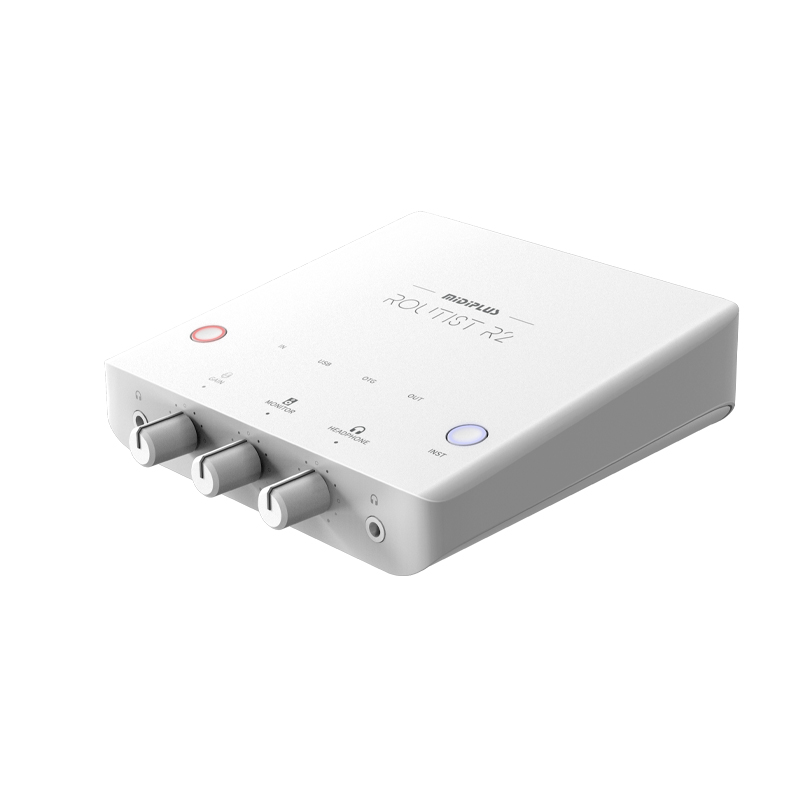
MIDIPLUS Routist R2 GEN II USB-C Audio Interface – New, Phone & Computer Ready
$119.00
New
View on OTORELAYCheck listings for current price and availability.